/4 分钟/4 阅读/0 评论
spring cache
1 基于注解的支持 Spring为我们提供了几个注解来支持Spring Cache。其核心主要是@Cacheable和@CacheEvict。使用@Cacheable标记的方法在执行后Spring Cache将缓存其返回结果,而使用@Cac
1 基于注解的支持
Spring为我们提供了几个注解来支持Spring Cache。其核心主要是@Cacheable和@CacheEvict。使用@Cacheable标记的方法在执行后Spring Cache将缓存其返回结果,而使用@CacheEvict标记的方法会在方法执行前或者执行后移除Spring Cache中的某些元素。下面我们将来详细介绍一下Spring基于注解对Cache的支持所提供的几个注解。
1 @Cacheable
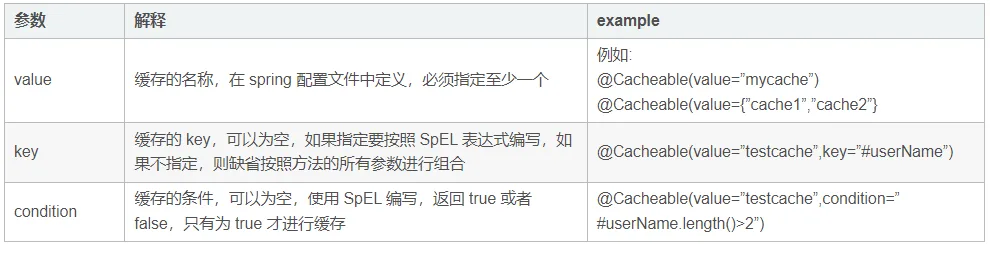
@Cacheable可以标记在一个方法上,也可以标记在一个类上。当标记在一个方法上时表示该方法是支持缓存的,当标记在一个类上时则表示该类所有的方法都是支持缓存的。对于一个支持缓存的方法,Spring会在其被调用后将其返回值缓存起来,以保证下次利用同样的参数来执行该方法时可以直接从缓存中获取结果,而不需要再次执行该方法。Spring在缓存方法的返回值时是以键值对进行缓存的,值就是方法的返回结果,至于键的话,Spring又支持两种策略,默认策略和自定义策略,这个稍后会进行说明。需要注意的是当一个支持缓存的方法在对象内部被调用时是不会触发缓存功能的。@Cacheable可以指定三个属性,value、key和condition。
@Cacheable注解可以将方法运行的结果进行缓存,在缓存时效内再次调用该方法时不会调用方法本身,而是直接从缓存获取结果并返回给调用方。
    @Cacheable(value = nameCache,key = "#name",condition = "#name.length()>2")
    public String cacheAble(String name){
        System.out.println("执行cacheAble方法");
        return name+"Able";
    }
1.2 @CachePut
在支持Spring Cache的环境下,对于使用@Cacheable标注的方法,Spring在每次执行前都会检查Cache中是否存在相同key的缓存元素,如果存在就不再执行该方法,而是直接从缓存中获取结果进行返回,否则才会执行并将返回结果存入指定的缓存中。@CachePut也可以声明一个方法支持缓存功能。与@Cacheable不同的是使用@CachePut标注的方法在执行前不会去检查缓存中是否存在之前执行过的结果,而是每次都会执行该方法,并将执行结果以键值对的形式存入指定的缓存中。
@CachePut 注解一般用于更新缓存数据,相当于缓存使用的是写模式中的双写模式
    @CachePut(value = nameCache,key = "#name",,condition = "#name.length()>2")
    public String cachePut(String name){
        System.out.println("执行cachePut方法");
        return name+"Put";
    }
1.3 @CacheEvict
@CacheEvict是用来标注在需要清除缓存元素的方法或类上的。当标记在一个类上时表示其中所有的方法的执行都会触发缓存的清除操作。@CacheEvict可以指定的属性有value、key、condition、allEntries和beforeInvocation。其中value、key和condition的语义与@Cacheable对应的属性类似。即value表示清除操作是发生在哪些Cache上的(对应Cache的名称);key表示需要清除的是哪个key,如未指定则会使用默认策略生成的key;condition表示清除操作发生的条件。下面我们来介绍一下新出现的两个属性allEntries和beforeInvocation。
@CacheEvict 注解的方法在被调用时,会从缓存中移除已存储的数据。@CacheEvict 注解一般用于删除缓存数据,相当于缓存使用的是写模式中的失效模式。
    @CacheEvict(value = nameCache)
    public  cacheEvict(){
        System.out.println("执行cacheEvict方法");
    }
快速入门
引入依赖
        <!--spring-缓存依赖-->
        <dependency>
            <groupId>org.springframework.boot</groupId>
            <artifactId>spring-boot-starter-cache</artifactId>
        </dependency>

        <!--方式二还需添加的依赖-->
        <dependency>
            <groupId>com.github.ben-manes.caffeine</groupId>
            <artifactId>caffeine</artifactId>
            <version>2.9.2</version>
        </dependency>
配置类
import com.github.benmanes.caffeine.cache.Caffeine;
import org.springframework.cache.CacheManager;
import org.springframework.cache.annotation.EnableCaching;
import org.springframework.cache.caffeine.CaffeineCache;
import org.springframework.cache.concurrent.ConcurrentMapCache;
import org.springframework.cache.support.SimpleCacheManager;
import org.springframework.context.annotation.Bean;
import org.springframework.context.annotation.Configuration;
import java.util.*;
import java.util.concurrent.TimeUnit;

@Configuration
@EnableCaching
public class CacheConfig {
    final List<String> CACHE_NAMES = Arrays.asList("nameCache","nameCache1","nameCache2");


    // 方法一
    @Bean
    public CacheManager cacheManager() {
        SimpleCacheManager cacheManager = new SimpleCacheManager();
        Set<ConcurrentMapCache> mapCaches=new HashSet<>();
        for (String cacheName : CACHE_NAMES) {
            //配置cache类型与目录
            mapCaches.add(new ConcurrentMapCache(cacheName));
        }
        cacheManager.setCaches(mapCaches);
        cacheManager.afterPropertiesSet();
        return cacheManager;
    }

    //方法二
    @Bean
    public CacheManager cacheManager() {
        SimpleCacheManager cacheManager = new SimpleCacheManager();

        List<CaffeineCache> caffeineCaches = new ArrayList<>();
        for (String cacheName: CACHE_NAMES) {
            caffeineCaches.add(new CaffeineCache(cacheName,
                                                 Caffeine.newBuilder()
                                                 .initialCapacity(50)
                                                 .maximumSize(30000)//最大存储数量
                                                 .expireAfterWrite(2, TimeUnit.HOURS)//过期时间2 小时
                                                 .build()));
        }
        cacheManager.setCaches(caffeineCaches);
        return cacheManager;
    }


}
demo
import org.springframework.cache.annotation.CacheEvict;
import org.springframework.cache.annotation.CachePut;
import org.springframework.cache.annotation.Cacheable;
import org.springframework.cache.annotation.EnableCaching;
import org.springframework.stereotype.Component;
import org.springframework.stereotype.Service;

@Component
public class CacheService {

    final String nameCache = "nameCache";

    @Cacheable(value = nameCache,key = "#name",condition = "#name.length()>2")
    public String cacheAble(String name){
        System.out.println("执行cacheAble方法");
        return name+"Able";
    }


    @CachePut(value = nameCache,key = "#name",condition = "#name.length()>2")
    public String cachePut(String name){
        System.out.println("执行cachePut方法");
        return name+"Put";
    }


    @CacheEvict(value = nameCache)
    public void cacheEvict(){
        System.out.println("执行cacheEvict方法");
    }
}
参考